
- How to enroll in FINSYNC and create an account
- Submit Your Business Registration/Formation Request
- What to expect after submitting your business registration
How to Enroll in FINSYNC and Create an Account
1. Go to www.FINSYNC.com
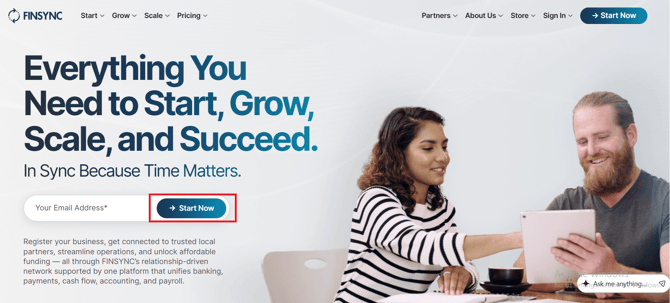
2. There are two options on the home page to enroll in FINSYNC and create an account
-
You can click Start Now on the upper-right portion of the page which will take you to the pricing page with plan options
-
In the middle portion of the home page you should see an option to enter your email address and then click Start Now
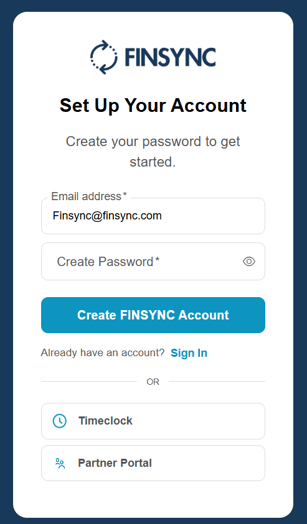
3. This will take you to the login page to create your new password.
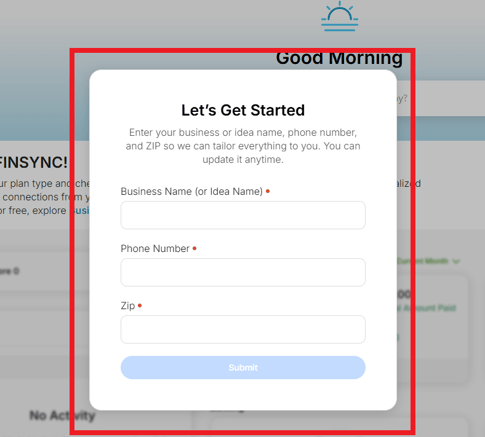
4. After creating your password and logging in, you will see this page:
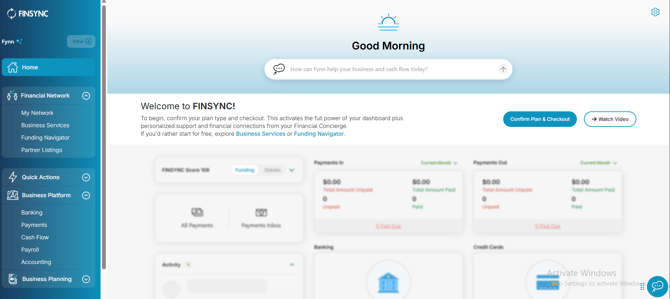
5. Once you are logged into FINSYNC, you will see the Home screen:
Submit Your Business Registration/Formation Request
Once you have created your FINSYNC account, you can proceed to submit your the Business Registration request.
1. From the home page click Start and Set Up Your Business. You can also click Business Services within the Financial Network section and click Get Started under New Business Registration.
2. Next you will proceed through a 7 step set of questions to submit your business registration
3. At the end you will see a checkout screen and a summary of Your Registration Total, with includes the costs associated with the options you selected. Click Checkout Now to proceed to the payment screen.
4. Enter your payment information and click Place Order
5. Congratulations! You are on your way to forming your business
What to expect after submitting your business registration
After submitting your business registration request, you will see a message from FINSYNC's Business Services team within FINSYNC. You will receive an email notification when a message is sent to you regarding the status of your order and any details, including any actions needed by you to proceed.
If you have any questions, please contact FINSYNC Support: https://resources.finsync.com/finsync-contact-info
Related Articles:
How to Add Your First Bank Account in FINSYNC
FINSYNC and Multifactor Authentication (MFA)
Contact FINSYNC for Questions and Support